
DF Studio
Write the equations. DF Studio works out the rest.
A free, open-source equation solver for engineering models, with thermodynamic properties and cycle tools built in. Equations are written in any order, the way they would be written on paper; DF Studio finds which equation determines which variable, solves the system, and keeps the results in sync with tables, plots and a flowsheet of the cycle.
1Features
Know what is solvable before you solve
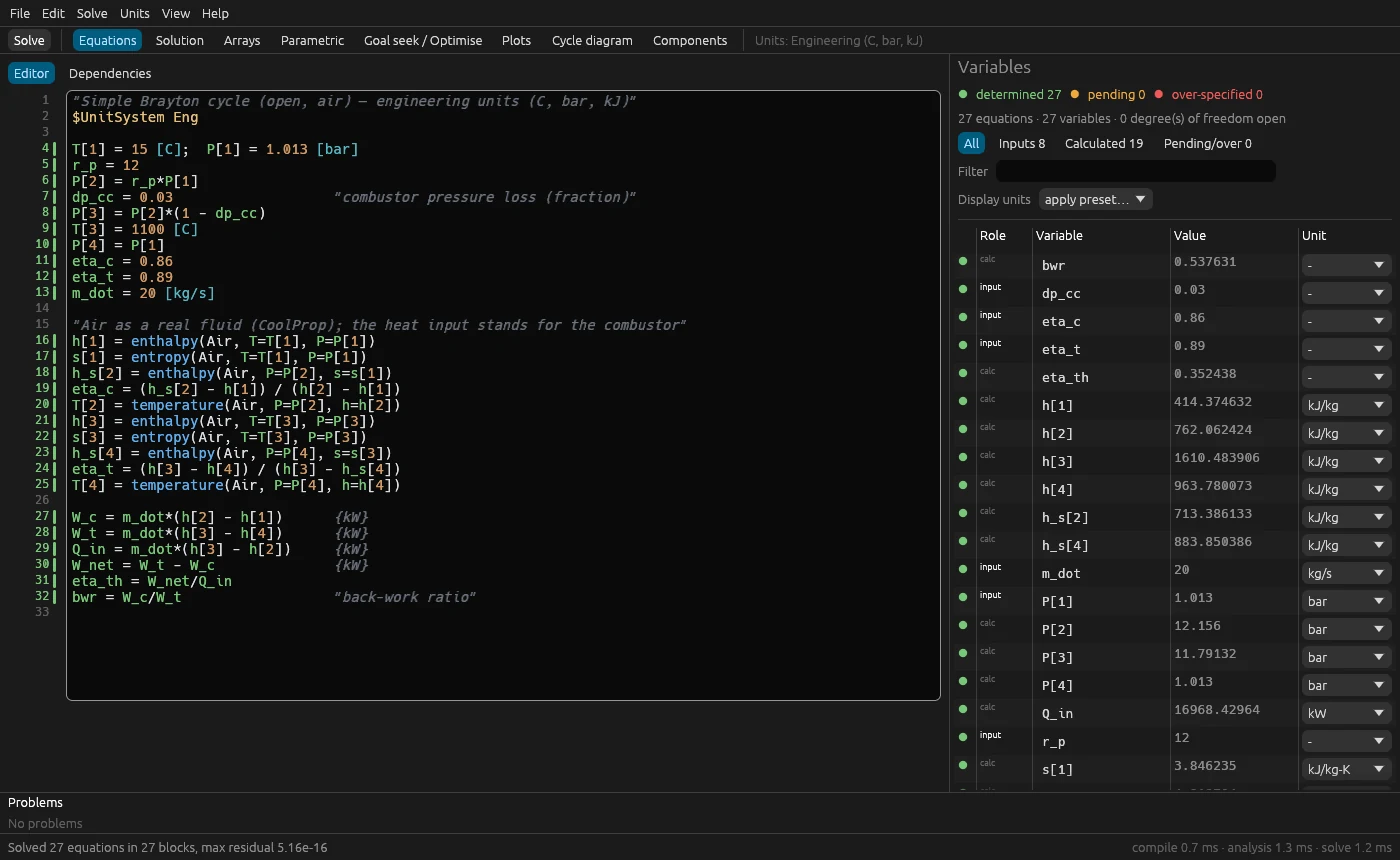
The model is analysed as you type. Every variable is coloured: green when the equations determine it, orange when more equations are needed, red when it is over-specified. The header reports how many degrees of freedom are still open, and which variables they are.
See how the model is solved
Equations › Dependencies shows the solve order: which equations are evaluated directly, which are solved together in a Newton block, how many iterations each block took and its residual. When a model fails, the message names the block and the variables that did not converge.
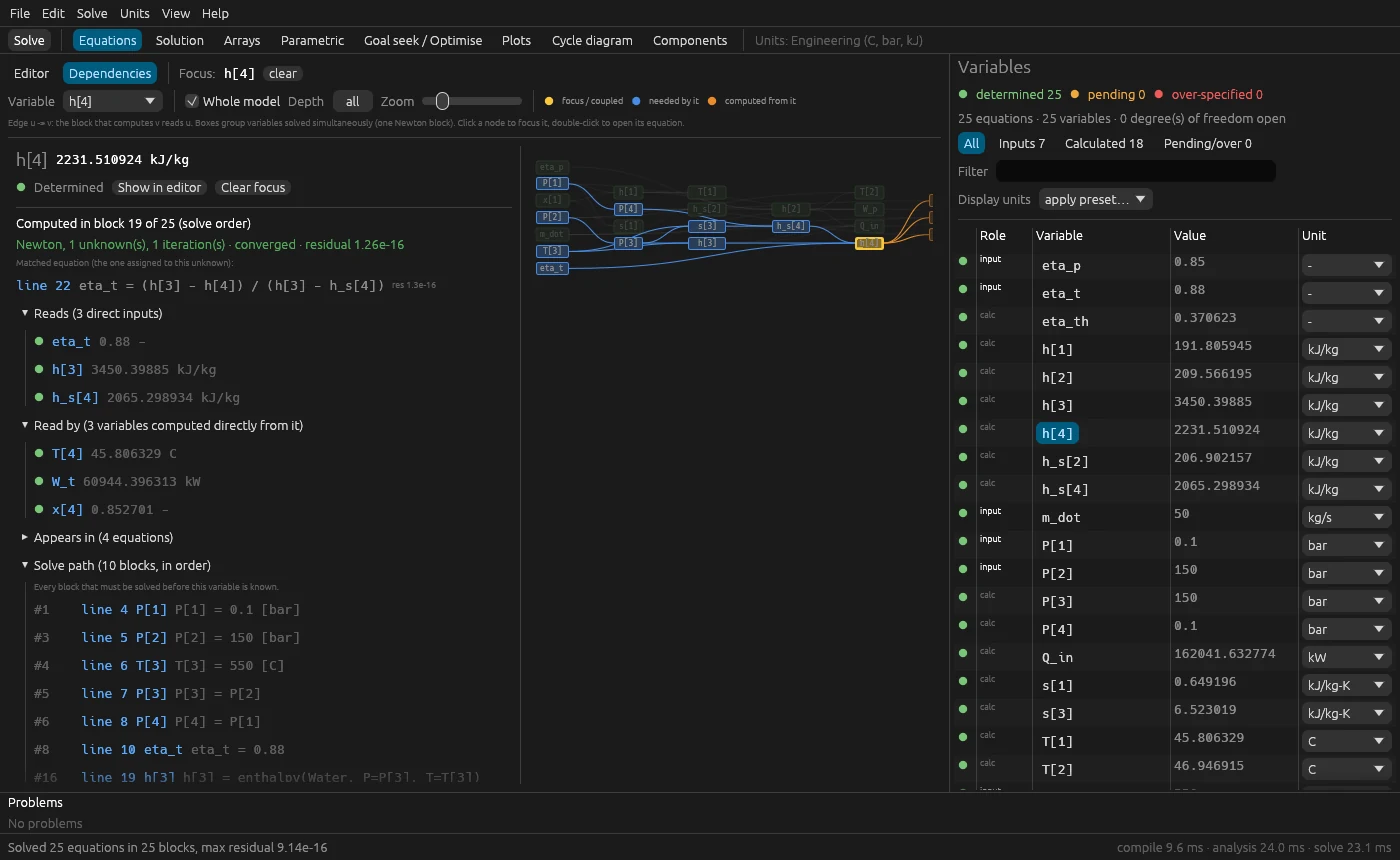
h[4] is computed, its Newton block and the solve path.Real-fluid properties included
Water, CO₂, refrigerants, air and over a hundred other fluids and mixtures through CoolProp, plus ideal gases with thermochemical reference states (for combustion), humid air, molten salts, liquid metals and thermal oils. Inputs CoolProp cannot take directly, such as temperature with enthalpy, are solved for you.
Flowsheets bound to the equations
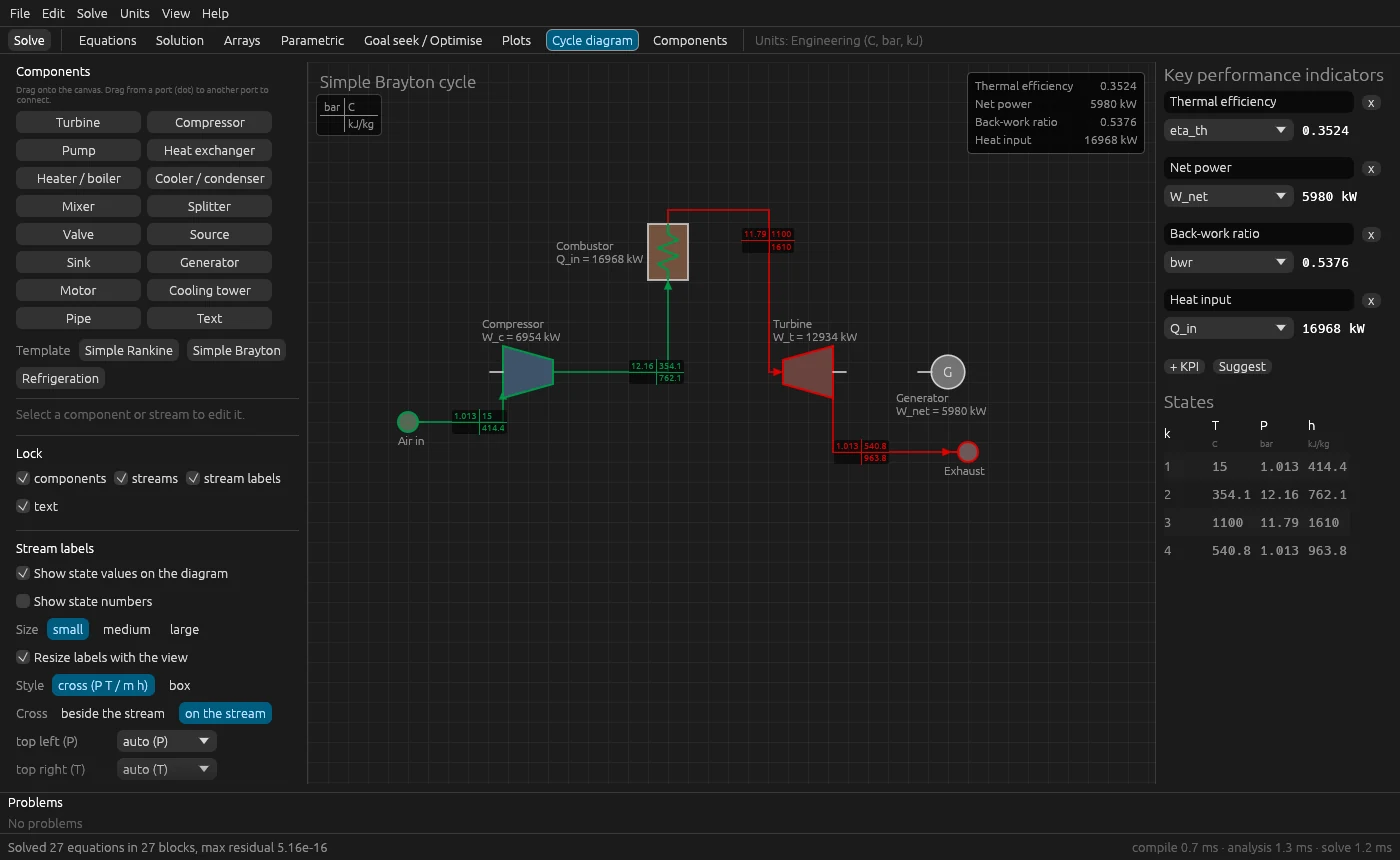
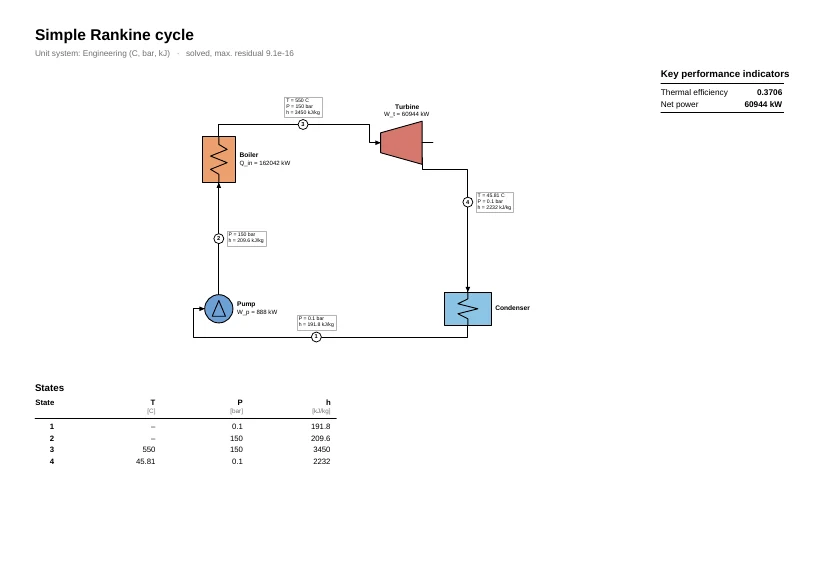
Draw the cycle (turbines, compressors, pumps, heat exchangers, mixers, valves, cooling towers, …) or start from a template. Each stream shows the state values of the current solution, and a double-click on a component opens its report: balances, isentropic efficiency, pinch analysis and UA of heat exchangers, T–Q diagrams, entropy generation and exergy destruction.
Studies without scripting
- Parametric tables solved in parallel on all CPU cores.
- Goal seek and multi-variable matching (vary X and Z until Y₁ = Y₂ and W = 5 MW).
- Optimisation: Brent, Nelder–Mead or global differential evolution.
- Control loops written in the model:
$Control vary P[2] to make T[4] = 540.
Publication-ready output
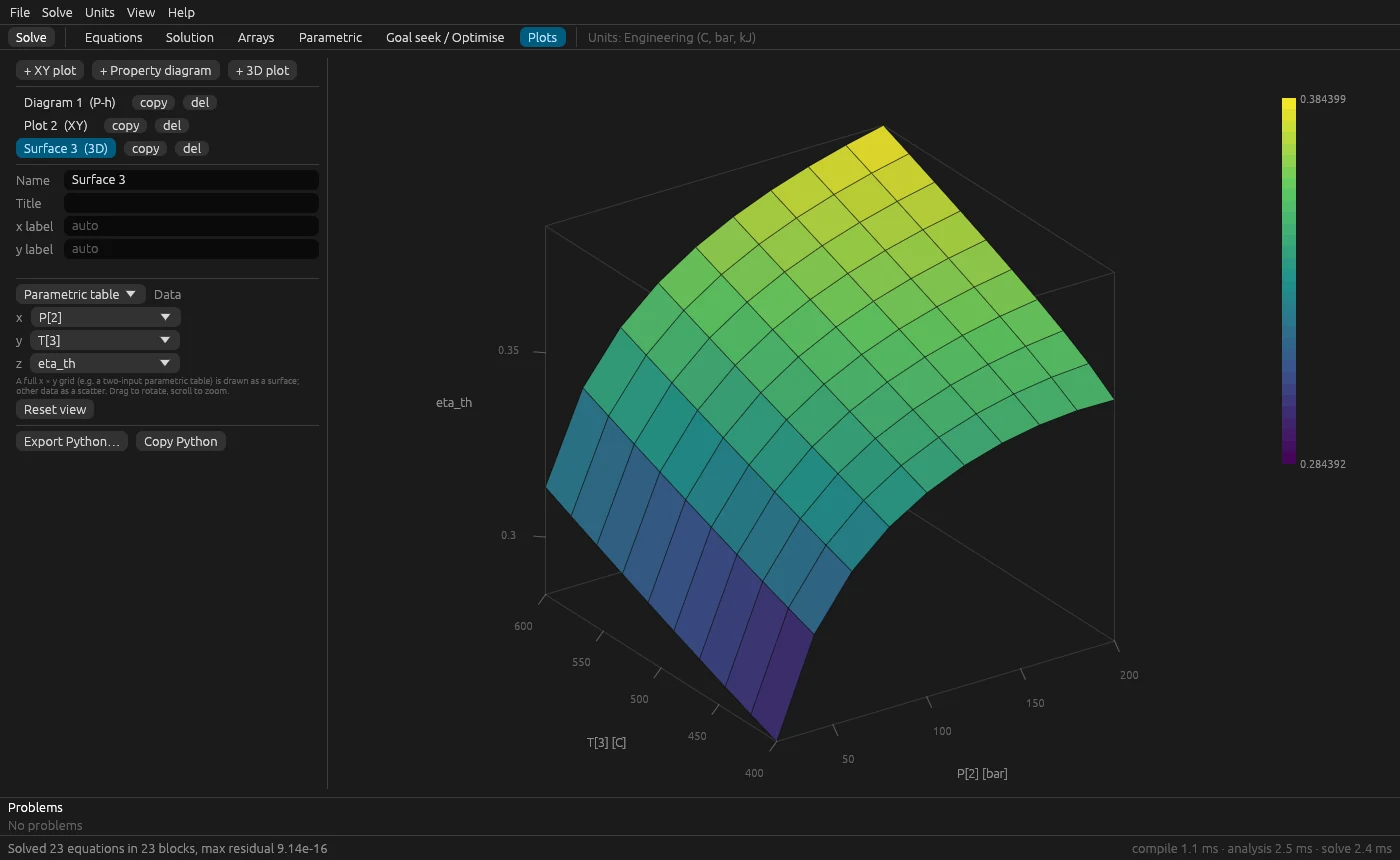
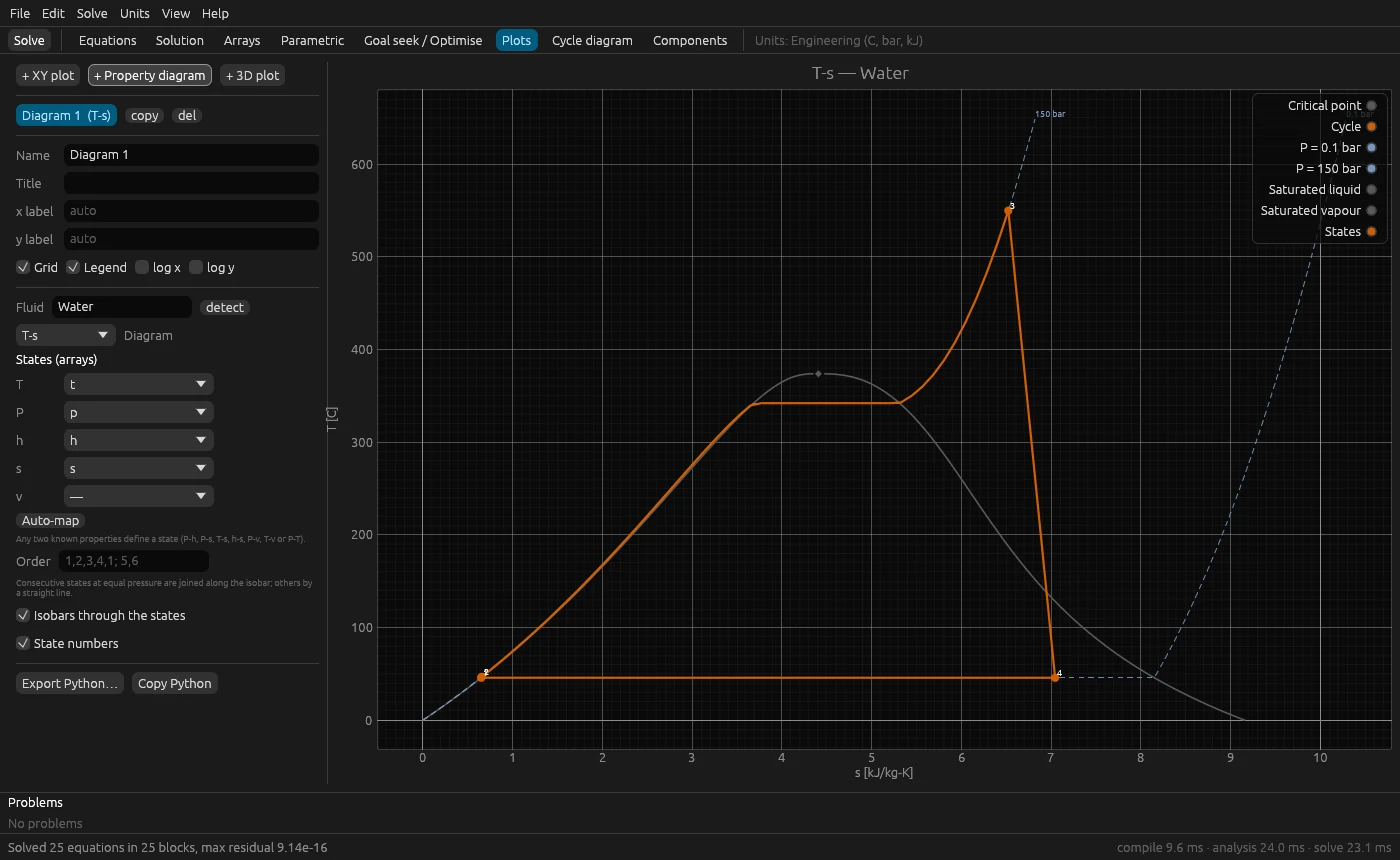
- T–s, P–h, h–s, P–v and T–h diagrams with the saturation dome and the cycle on top; XY and 3D plots.
- Export Python writes a self-contained matplotlib script with the data embedded, for vector figures in papers and theses.
- A vector PDF report (flowsheet, KPIs, state table) written directly, without LaTeX or any other tool.
Projects that travel
A .df file holds the equations, units, studies, plots,
flowsheet, last solution and any attached data or images in one
checksummed file that opens identically on another computer. Equations
can also be kept as plain .dfs text for version control.
Units handled for you
Choose a unit system (°C/bar/kJ, SI, imperial or custom), write
10 [bar] or 25 [C] anywhere, and show each
variable in its own display unit. Dimensions are inferred from the
equations, so only compatible units are offered, and inconsistent
equations are flagged.
Automate it
The dfs command line solves models in batch or in CI, and
the dfpy Python package reads .df projects into
numpy and pandas.
Bring existing models
EES files (.ees, text and binary) open directly, so
models written for EES run without retyping. The
migration guide
lists the differences and a step-by-step checklist.
2A first model
A simple Rankine cycle. The pump and turbine outlet enthalpies
h[2] and h[4] are never assigned: DF Studio
finds them from the efficiency definitions.
"Simple Rankine cycle"
$UnitSystem Eng

P[1] = 0.1 [bar];  x[1] = 0
P[2] = 150 [bar];  T[3] = 550 [C]
P[3] = P[2];       P[4] = P[1]
eta_p = 0.85;      eta_t = 0.88;   m_dot = 50 [kg/s]

h[1] = enthalpy(Water, P=P[1], x=x[1])
s[1] = entropy(Water, P=P[1], x=x[1])
h_s[2] = enthalpy(Water, P=P[2], s=s[1])
eta_p = (h_s[2] - h[1]) / (h[2] - h[1])
h[3] = enthalpy(Water, P=P[3], T=T[3])
s[3] = entropy(Water, P=P[3], T=T[3])
h_s[4] = enthalpy(Water, P=P[4], s=s[3])
eta_t = (h[3] - h[4]) / (h[3] - h_s[4])

W_net = m_dot*((h[3] - h[4]) - (h[2] - h[1]))
eta_th = W_net / (m_dot*(h[3] - h[2]))
Press F2: eta_th = 0.3706 and
W_net = 60 056 kW. The
user guide
continues from here; the bundled
examples
cover Rankine, Brayton and refrigeration cycles.
3How a model is solved
A model is treated as a system of nonlinear algebraic equations
F(x) = 0, not as a script executed from top to bottom. The same
pipeline runs in the desktop app, in the dfs command line and
in the tests.
- Structural analysis. Equations are matched to unknowns; the Dulmage–Mendelsohn decomposition separates over-, well- and under-determined parts, and Tarjan’s algorithm orders the system into blocks.
- Block solution. An equation of the form
x = f(known)is evaluated directly, with no iteration. The rest are solved with Newton’s method, a backtracking line search and a Levenberg–Marquardt step when the Jacobian is singular. - Exact derivatives. Each equation is differentiated by reverse-mode automatic differentiation, and property calls use the analytic derivatives of the equations of state.
- Properties. Real fluids come from CoolProp (Bell et al., 2014); ideal gases of the common combustion species use NIST-JANAF reference states (Chase, 1998); humid air follows ASHRAE RP-1485.
Every step, tolerance and reference, and the source file that implements it, is documented in How DF Studio solves a model, including its sections on verification and limitations.
4Download
Latest release: DF Studio v0.1.0.
Each package includes the desktop app, the dfs command-line
solver, the CoolProp property library and example projects. No account,
licence key or internet connection is needed.
| System | Package | Notes |
|---|---|---|
| Windows 10/11 x64 |
Installer (.exe) Portable (.zip) |
Installs for all users, or without administrator rights for the current user only. |
| macOS 11+ Apple silicon and Intel |
Universal disk image (.dmg) | First launch: right-click the app and choose Open. |
| Linux x86-64, glibc 2.38+ |
AppImage | Ubuntu 24.04, Debian 13, Fedora 39 or newer. chmod +x, then run. |
SHA-256 checksums · All releases · Changelog · Build from source
5Documentation
- User guide
- Installing, writing models, units, studies, plots, cycle diagrams, files and shortcuts.
- Language reference
- Equations, arrays, functions and procedures, property functions, directives.
- How it works
- Structural analysis, Newton method, tolerances, derivatives, properties, studies, verification and references.
- Architecture
- Code organisation, design decisions, the
.dffile format, packaging. - Migrating from EES
- Running existing EES models, differences and a checklist. EES is a product of F-Chart Software; DF Studio is independent and not affiliated with it.
- Building and releasing
- Building from source with Rust 1.85 or newer, and making the installers.
6Project
DF Studio is free software, released under the GNU Affero General Public License v3.0. Third-party components and their licences (CoolProp: MIT; egui and the other Rust crates: MIT or Apache-2.0) are listed in the third-party notices.
Bug reports, models that fail to solve, and pull requests are welcome.